Using criticmarkup in obsidian
October 6, 2023
Following a conversation on Mastodon, I spent an hour or two procrastinating by settting up the Dynamic Highlights plugin to style CriticMarkup in Obsidian.
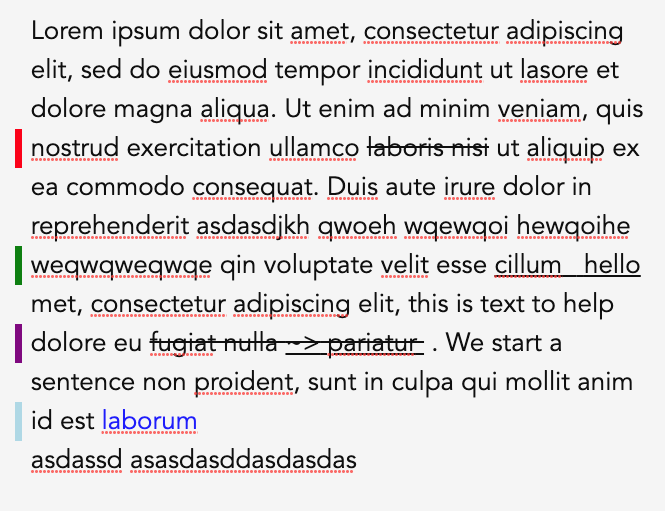
It’s a limited solution: it only works in the Live Preview editing mode, and there’s a conflict between the { ~~ ~> ~~ } form and the ~~ ~~ form that Obsidian uses for strikethrough.
Nonetheless, people might find it useful, so here it is:
- Install the Dynamic Highlights plugin from Community Plugins and enable it. Normal terms and conditions apply, I’m not associated with that plugin and make no warranty for it.
- Copy the below and import it in the Dynamic Highlights settings - it’s up in the top right.
   {
  "CMDeletion": {
    "class": "CMDeletion",
    "color": "",
    "regex": true,
    "query": "\\{--.*--\\}",
    "mark": [
      "match"
    ],
    "css": ""
  },
  "CMAddition": {
    "class": "CMAddition",
    "color": "",
    "regex": true,
    "query": "\\{\\+\\+.*\\+\\+\\}",
    "mark": [
      "match"
    ],
    "css": ""
  },
  "CMAdditionHide": {
    "class": "CMAdditionHide",
    "color": "",
    "regex": true,
    "query": "\\{\\+\\+|\\+\\+\\}",
    "mark": [
      "match"
    ],
    "css": ".CMAddition {\n text-decoration: underline;\n}\n"
  },
  "CMHide": {
    "class": "CMHide",
    "color": "",
    "regex": true,
    "query": "\\{\\+\\+|\\+\\+\\}|\\{--|--\\}|\\{>>|<<\\}|\\{~~|~~\\}",
    "mark": [
      "match"
    ],
    "css": ""
  },
  "CMComment": {
    "class": "CMComment",
    "color": "",
    "regex": true,
    "query": "\\{>>.*<<\\}",
    "mark": [
      "match"
    ],
    "css": "\n"
  },
  "CMSubstitutionAdd": {
    "class": "CMSubstitutionAdd",
    "color": "",
    "regex": true,
    "query": "~>(.*)~~\\}",
    "mark": [
      "match"
    ],
    "css": ""
  },
  "CMSubstitutionDelete": {
    "class": "CMSubstitutionDelete",
    "color": "",
    "regex": true,
    "query": "\\{~~(.*)~>",
    "mark": [
      "match"
    ],
    "css": ""
  }
}
- Copy the following into a snippet and install that.
.CMAddition {
	text-decoration: underline;
}
.CMAddition::after {
  position: relative;
  float: left;
  content: " ";
  margin-left: -1rem;
  background-color: green;
}
.CMHide {
  display: none;
}
.CMDeletion {
	text-decoration: line-through;
}
.CMDeletion::after {
  position: relative;
  float: left;
  content: " ";
  margin-left: -1rem;
  background-color: red;
}
.CMComment {
  color: blue;
}
.CMComment::after {
  position: relative;
  float: left;
  content: " ";
  margin-left: -1rem;
  background-color: lightblue;
}

.CMSubstitutionAdd::after {
  position: relative;
  float: left;
  content: " ";
  margin-left: -1rem;
  background-color: purple;
}
.CMSubstitutionDelete {
	text-decoration: line-through;
}
.CMSubstitutionAdd {
	text-decoration: underline ;
}
You might need to restart before it all works,
Any questions or issues: I’m on Mastodon: Colman@mastodon.ie